
 How to Recognise a Fake Account Recovery Message
 2026-08-21
Introduction
Account recovery messages can be useful when someone has forgotten a password or cannot access an account. However, unexpected messages claiming to help recover an account can also be used for phishing. For users following Lotus365 account information, recognising suspicious recovery messages is an important part of maintaining account security.
What Makes a Recovery Message Suspicious?
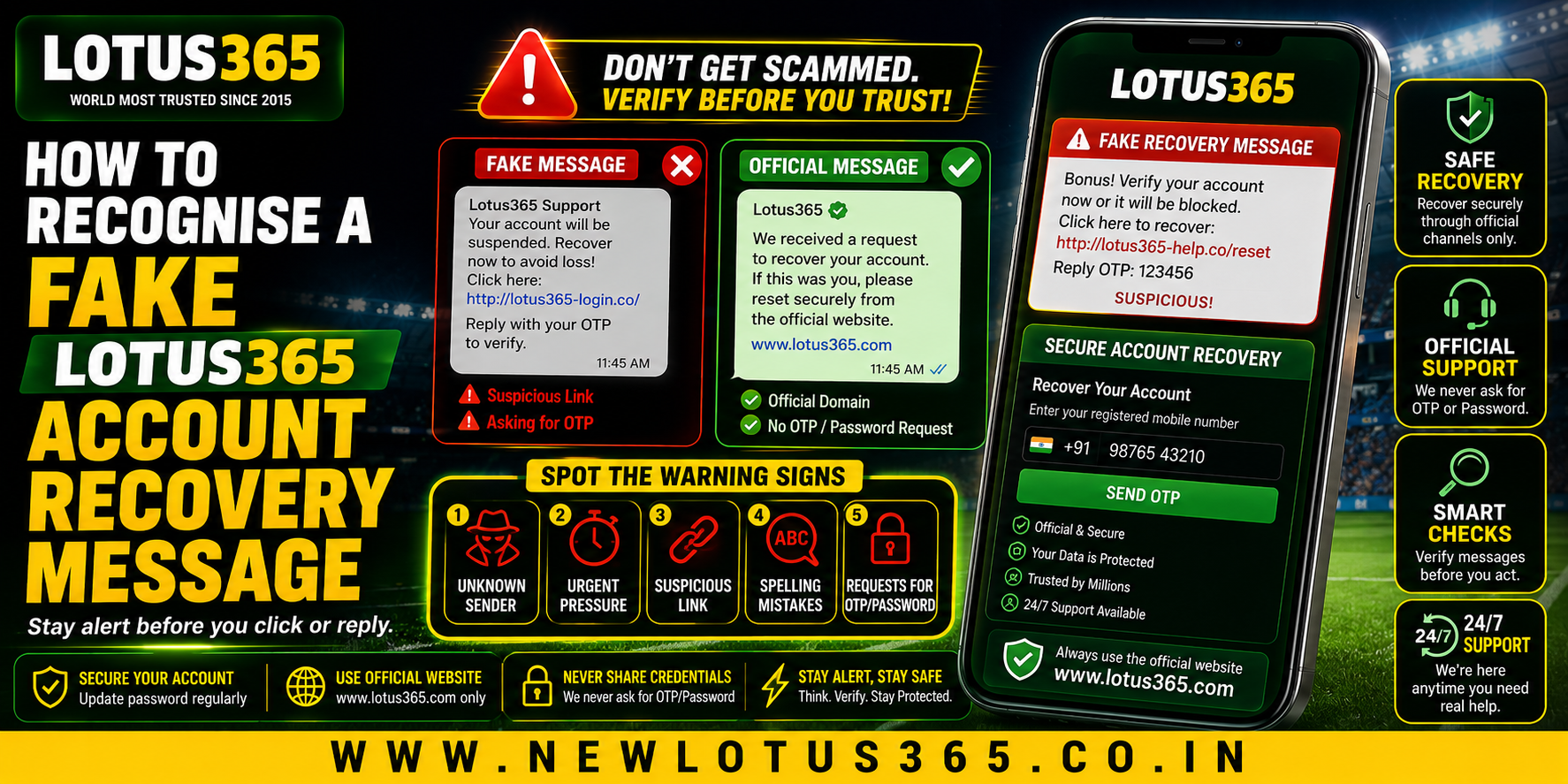
A fake recovery message often tries to create urgency. It may claim that an account will be blocked, a password has expired, or immediate verification is required.
Common warning signs include:
- Unexpected password-reset requests
- Urgent or threatening language
- Unknown senders
- Strange website addresses
- Requests for sensitive information
- Spelling or formatting mistakes
- Unusual attachments
- Promises of instant account restoration
A legitimate-looking design does not automatically mean a message is genuine.
1. Check Whether You Requested Recovery
The first question should be simple: did you actually request a password reset?
If you did not request recovery but receive a message saying a reset has been initiated, avoid interacting with it immediately.
Do not assume the message is genuine simply because it contains your username or other basic information.
2. Examine the Sender Carefully
Check the sender's address or account name before responding.
A suspicious message may use:
- Random email addresses
- Unofficial domains
- Extra characters in the sender name
- Misspelled company names
- Free email accounts
- Numbers or symbols designed to imitate a legitimate address
The sender name alone is not enough. The complete address should be reviewed.
3. Inspect the Recovery Link
Links deserve particular attention.
Before opening one, check where it leads. A suspicious URL may contain:
- Unusual spelling
- Extra words
- Random numbers
- Unrelated domains
- Long strings of characters
- A domain that does not match the expected website
A padlock or HTTPS connection does not prove that a website is legitimate. Scam websites can also use encrypted connections.
4. Never Share Your Password
A genuine recovery process should not require you to send your existing password through a message.
Be cautious if someone asks for:
- Current password
- One-time password
- Login PIN
- Banking credentials
- Full payment information
- Security answers
Treat such requests as a major warning sign.
5. Be Careful With OTP Requests
One-time passwords are designed to help verify access. If someone asks you to forward an OTP received on your phone, do not share it.
A scammer may already have some account information and use the OTP to complete an unauthorised login or recovery attempt.
Always keep verification codes private.
6. Watch for Artificial Urgency
Scammers often use pressure to prevent users from thinking carefully.
Examples include messages saying:
- “Act immediately”
- “Your account will be deleted”
- “Verify within 10 minutes”
- “Final security warning”
- “Your account is suspended”
Legitimate security procedures can involve deadlines, but unexpected pressure should encourage you to verify the message independently.
7. Avoid Unknown Attachments
A recovery message should not normally require you to download an unfamiliar file.
Be especially careful with:
- APK files
- Executable files
- Unknown documents
- Compressed archives
- Unfamiliar applications
Installing an unknown application can create additional security risks for your device and account.
8. Use a Safer Recovery Method
If you genuinely need to recover your account, avoid relying on a suspicious message.
Instead:
- Open your browser manually.
- Navigate to the platform through a trusted source.
- Locate the account recovery option.
- Follow the instructions shown there.
- Contact official support if the process does not work.
This approach avoids clicking potentially malicious links inside unsolicited messages.
Protecting Your Lotus365 ID
Users managing a Lotus365 ID should keep login credentials private and avoid sharing recovery codes with other people. Using a unique password and securing the email or phone number connected to an account can also reduce the risk of unauthorised access.
If you suspect that your credentials have been exposed, change the affected password through the legitimate account-recovery process and review recent account activity where available.
What to Do After Receiving a Suspicious Message
If a message appears fake:
- Do not click its links.
- Do not reply.
- Do not provide passwords or OTPs.
- Do not download attachments.
- Take a screenshot if necessary for reporting.
- Delete or report the message.
- Use the legitimate recovery route if access is genuinely required.
Common Mistakes to Avoid
Some users accidentally increase their risk by reacting too quickly.
Avoid:
- Clicking recovery links without checking them
- Reusing the same password across accounts
- Sharing OTPs with supposed support agents
- Installing unknown recovery applications
- Trusting messages because they contain personal details
- Assuming HTTPS means a website is trustworthy
Security depends on several layers rather than one warning sign.
Conclusion
Fake account recovery messages often rely on urgency, convincing designs, suspicious links, and requests for sensitive information. The safest approach is to pause and verify the message before taking any action.
If recovery is genuinely required, start the process independently through a trusted website or official support channel rather than using an unexpected link. Keeping passwords and verification codes private also provides an important layer of protection.
FAQs
1. How can I tell if an account recovery message is fake?
Check whether you requested the recovery, inspect the sender and URL, and look for requests for passwords, OTPs, or other sensitive information.
2. Should I click a password-reset link from an unexpected message?
It is safer not to click it. Open the legitimate website independently and begin the recovery process from there.
3. Can a fake recovery message look professional?
Yes. Scammers can copy logos, colours, layouts, and language to make messages appear convincing.
4. Should I share an OTP with support?
No. Never share a one-time password with someone who contacts you unexpectedly.
5. Is HTTPS enough to prove a recovery website is genuine?
No. HTTPS encrypts the connection but does not prove that the website itself is legitimate.
6. What should I do if I already entered my password on a suspicious page?
Change the password immediately through the legitimate recovery route and review relevant account activity. If the same password is used elsewhere, change it there too.